


ICROWN iTask: Your Daily Mission Center for Bonuses and Rewards
ICROWN iTask: Login Daily to Complete Missions and Claim Your Rewards
What Is ICROWN iTask?
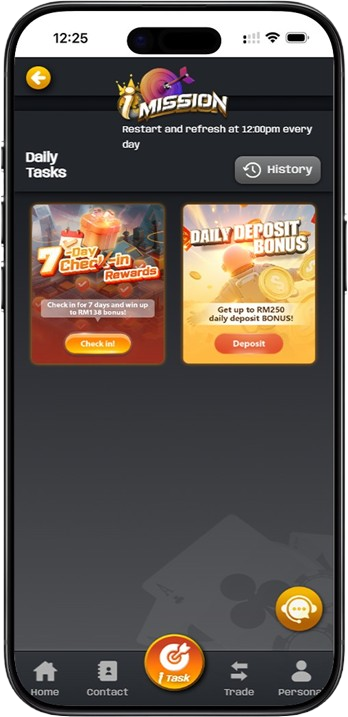
ICROWN iTask is the central mission hub for all ICROWN players. This is where you can view, track, and claim your daily and weekly rewards. The ICROWN iTask platform features two main missions: Daily Deposit Bonus and 7 Day Check-in Rewards. After you login to your ICROWN account, navigate to iTask to access your missions, check your progress, and claim your bonuses.
Why Use ICROWN iTask?
The ICROWN iTask system resets and refreshes every day at 12:00 PM (GMT+8), giving you fresh opportunities to earn rewards on a regular schedule. Instead of searching through multiple pages, the iTask dashboard consolidates all active missions, shows your reset timing, and helps you keep track of your claim history in one place.
ICROWN iTask Daily Deposit Bonus Mission

What Is the Daily Deposit Bonus Mission in iTask?
The Daily Deposit Bonus mission in ICROWN iTask allows you to claim up to RM250 in bonus funds every day. This mission is based on your daily deposit amount, with six tiers ranging from RM1-RM5 for smaller deposits up to RM126-RM250 for deposits above RM5,001. To participate, simply make a deposit of any amount, return to iTask, and click the deposit or claim option for Daily Deposit Bonus.
Each player can claim the Daily Deposit Bonus only once per day through ICROWN iTask. The bonus tier is determined by your total accumulated deposits for the day, not just a single transaction. If you make multiple deposits throughout the day, the system calculates the total and applies the corresponding random reward tier before the daily reset at 12:00 PM (GMT+8).
ICROWN iTask 7 Day Check-in Rewards Mission

What Is the 7 Day Check-in Rewards Mission in iTask?
The 7 Day Check-in Rewards mission in ICROWN iTask is a weekly promotion for players who make consecutive daily deposits from Monday to Sunday. You must deposit RM10 or more from Monday to Friday, and RM30 or more on Saturday and Sunday. After each deposit, you must return to iTask and click the Check-in button for that day. The system does not automatically register your progress without this manual action.
If you complete all seven days successfully, you can win up to RM138 on Sunday alone, with Saturday offering RM8-RM38 and Sunday offering RM8-RM138 in random iChip rewards. The weekly cycle starts every Monday at 12:00 PM (GMT+8). If you start late, miss a day, or forget to click the check-in button, your progress is interrupted and you must wait for the next Monday to restart.
How to Use ICROWN iTask to Claim Your Bonuses
Step 1: Complete Your ICROWN Register and Login
To access ICROWN iTask, you must first have an active ICROWN account. If you have not done so yet, complete the ICROWN register process with your username, password, and phone number. Once your account is ready, log in and open the iTask section from the main menu or your dashboard.
Step 2: View Available Missions in iTask
Inside ICROWN iTask, you will see the available missions displayed clearly. The Daily Deposit Bonus mission shows your possible rewards based on deposit amount, while the 7 Day Check-in Rewards mission shows your current weekly progress and remaining days. The interface also shows your claim history for easier tracking.
Step 3: Make Your Deposit
To complete either mission in ICROWN iTask, you must first make a deposit. Any deposit amount qualifies you for a Daily Deposit Bonus tier, while the 7 Day Check-in Rewards require at least RM10 on weekdays or RM30 on weekends. After depositing, return to iTask to continue the mission flow.
Step 4: Claim Your Bonus or Click Check-in
For the Daily Deposit Bonus mission, click the deposit or claim option to receive your random reward. For the 7 Day Check-in Rewards mission, click the Check-in button to register that day's completion. Manual claiming is required for both missions, and the day will not count if you do not press the button.
Step 5: Track Your Progress in iTask History
ICROWN iTask includes a History feature that lets you review your past claims and check-ins. You can see your Daily Deposit Bonus records, track previous 7 Day Check-in progress, and use that history to plan your next deposit and claim schedule more effectively.
ICROWN iTask Reset and Refresh Schedule
Daily Reset at 12:00 PM (GMT+8)
ICROWN iTask restarts and refreshes every day at 12:00 PM (GMT+8). This applies directly to the Daily Deposit Bonus mission, which means your deposit total resets to zero and you can start earning a new bonus for the next day. Any unclaimed Daily Deposit Bonus from the previous day is forfeited after the reset.
Weekly Reset for 7 Day Check-in Rewards
The 7 Day Check-in Rewards mission follows a weekly reset schedule. Each cycle starts on Monday at 12:00 PM (GMT+8) and ends the next Monday at 11:59 AM (GMT+8). If you fail to complete all seven days within the active window, you must wait until the following Monday to begin again.
Frequently Asked Questions About ICROWN iTask
Do I Need to Do Anything Special to Access ICROWN iTask?
No special extra step is required. Once you complete your ICROWN registration and login, simply open the iTask section. The feature is available to all registered players without separate opt-in or additional registration.
What Happens If I Forget to Click Check-in in iTask?
If you forget to click the Check-in button after making your deposit, the day will not count toward your 7 Day Check-in Rewards progress. Even if the deposit requirement was met, manual check-in inside ICROWN iTask is still required.
Can I See My Past Claims in ICROWN iTask?
Yes. ICROWN iTask includes a History section where you can review your previous claims and check-ins. This lets you monitor past Daily Deposit Bonus claims, previous weekly streaks, and your overall reward activity.
What Time Does ICROWN iTask Reset?
ICROWN iTask resets daily at 12:00 PM (GMT+8). At that time, the Daily Deposit Bonus mission refreshes and any unclaimed bonus from the previous day is lost. The 7 Day Check-in Rewards weekly cycle also resets every Monday at 12:00 PM (GMT+8).
Why Can't I Claim My Daily Deposit Bonus in iTask?
If you cannot claim your Daily Deposit Bonus in ICROWN iTask, check whether you have made a qualifying deposit, confirm that you have not already claimed a bonus for the current day, make sure you are claiming before the reset time, and verify that you clicked the correct claim option inside iTask. If the issue continues, contact ICROWN customer support.
Tips to Maximize Your ICROWN iTask Experience
Set a Daily Reminder to Check iTask
To make the most of ICROWN iTask, set a daily reminder to visit the mission center after your deposit. Because the system requires manual claiming, a consistent routine helps ensure that you do not miss available rewards.
Check iTask Before the Daily Reset
Since ICROWN iTask resets daily at 12:00 PM (GMT+8), always review your missions before that deadline. Any unclaimed Daily Deposit Bonus will be forfeited after reset, so checking in time protects the rewards you have already qualified for.
Track Your 7 Day Progress in iTask History
Use the ICROWN iTask History feature to monitor your 7 Day Check-in Rewards progress. Seeing which days are already complete and which are still pending helps you stay on track and avoid unnecessary interruption to your streak.
Plan Deposits Around iTask Reset Times
Understanding ICROWN iTask reset times helps you plan deposits more strategically. For example, a deposit before the daily reset may qualify one reward cycle, while another deposit after reset can qualify the next one, allowing you to maximize your bonus opportunities.
Start Using ICROWN iTask Today
Login to your ICROWN account now and visit iTask to claim your Daily Deposit Bonus up to RM250 and complete the 7 Day Check-in Rewards for up to RM138 in bonus value.
With daily resets at 12:00 PM (GMT+8) and easy manual claiming through iTask, your rewards are only a few clicks away. Do not miss the schedule. Check in, claim on time, and make full use of every mission available to you.